Open a popup from the «href» of a link

Today I found a problem that seemed silly but ultimately cost me a while to find the solution.

The problem is I was using a javascript component that «paints» a menu. This component receives a N dimensional matrix representing the menus and submenus.

Simplifying, this array receives for each menu item text to display and the URL where it has that option menu. Finally, the component generates something like this:

TEXT

The problem has come when I need has arisen that one of those links would open a popup, instead of redirecting to an URL.

In a normal environment it would be easy enough to do something like this:

TEXT

But the component does not allow me to put code in the «onclick» so the choice was to play with the parameter «URL» was wrong for opening the popup.

I tried several options:

1. TEXT

2. TEXT

3. TEXT

...

And managed to open the popup but then the page is reloaded and showed simply «[OBJECT], so it was not worth the solution. Much» return false; «that poking.

In the end the solution has been to write this:

TEXTOpen a popup from the "href" of a link
How to avoid triggering IE compatibility mode

Since the Internet Explorer version 8 there is the possibility that pages renderize emulating version 7. For version 9 can emulate the two previous versions.

This can come in handy for old sites, is a headache sometimes.

I have a couple of days going crazy with the following problem:

I’m using a jQuery plugin that I’ve created. This plugin looks a kind of menu elements positioned absolutely. This position is dynamically calculated.

For this calculation IE7 I do differently so I have a piece of code that detects the browser version and depending on if it’s 7 or greater, for one thing or another.

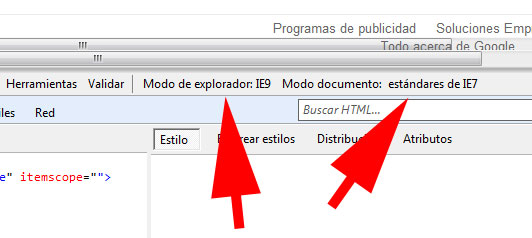
The problem comes because to deploy this plugin on the web, which is an intranet, the browser automatically (Internet Explorer 9) is configured to process the document as if the 7, but still identifying themselves as 9.

In this way from the receipt code is version 9 and acted accordingly, but as is treating the document as version 7, it looks all wrong. If I’m not mistaken behaves well to be opening an intranet web.

We can see this giving F12 in Internet Explorer.

There are directives to force IE to emulate a previous version, but what I want is the opposite, to run with version 9, which is really what it is.

And after much searching, this is the policy that you have to put into the HEAD of the page.

<meta http-equiv="X-UA-Compatible" content="IE=7,8,9" />

Calculate the width of a text, and shorten it to a number of pixels given in JavaScript

In some cases we may need to calculate from JavaScript the width of a text on the screen.
To do this we will use a layer that will make us as a rule. This layer must have the same styles that the fate of the text that we want to measure, or assigning these styles whenever we are going to measure.

This is the HTML for the layer:

<span id="ruler"></span>

The layer has to be hidden with the following CSS:

#ruler {
	visibility: hidden;
	white-space: nowrap;
	position: absolute;
	top: -100;
	left: 0px;
}

And finally we will extend the string class in JavaScript with two methods that will allow us to calculate the width of a text in pixels and trim a text to a specified width.

// Calcula los pixeles de ancho que ocupa un texto
String.prototype.visualLength = function() {
    var ruler = document.getElementById("ruler");
    ruler.innerHTML = this;
    return ruler.offsetWidth;
}

// Recorta un texto al número de pixeles indicados, añadiendo un "..." en el caso de haber sido recortado
String.prototype.trimToPx = function(length)
{
    var tmp = this;
    var trimmed = this;
    if (tmp.visualLength() > length)
    {
        trimmed += "...";
        while (trimmed.visualLength() > length)
        {
            tmp = tmp.substring(0, tmp.length-1);
            trimmed = tmp + "...";
        }
    }

    return trimmed;
}

Check if an array contains an element in JavaScript

JavaScript is unfortunately not implemented all the methods we have available from C # or VB.NET. One is the method «Contains» from the lists. With this code you can extend the class «Array» of JavaScript to implement this method:

Array.prototype.contains = function(element) {
    for (var i = 0; i < this.length; i++) {
        if (this[i] == element) {
            return true;
        }
    }
    return false;
}